This is a post from the https://blog.fka.dev/blog/2026-09-09-mcp-apps-in-cli-harnesses/ about A proposal for native terminal views over MCP, with a working plane seat picker in HTML, a TUI, and elicitation forms..
Written by Fatih Kadir Akın on September 09, 2026
---
Fatih is a passionate software developer from Istanbul, Turkey, currently leading Developer Relations at Teknasyon. He has authored books on JavaScript and prompt engineering for AI tools. With a deep enthusiasm for web technologies and AI-assisted development, he actively contributes to open-source projects and builds innovative things on GitHub. Beyond coding, Fatih enjoys organizing conferences and sharing knowledge through talks. A strong advocate for open-source collaboration, he specializes in JavaScript and Ruby (particularly Ruby on Rails). He also created prompts.chat, a platform for exploring and optimizing AI prompts for LLMs.
READ THIS POST CAREFULLY WITH ALL THE CHUNKS BEFORE RESPONDING.
This post contains explanations of some concepts in given context, code examples and instructions about the topic.
When you see a code block, analyze it and be ready to apply similar patterns. Pay attention to:
1. Code blocks marked with ```language-name - these contain example code
2. Explanatory text around the code that provides context
3. Any specific instructions or notes about implementation
4. Variable names and patterns that may need to be reused
When implementing similar code (if exists), maintain consistent:
- Naming conventions
- Code style and formatting
- Error handling patterns
- Documentation approach
The goal for the reader is to understand the concepts and be able to apply them appropriately in new situations.
Written by Fatih Kadir Akın, on September 09, 2026
---
# MCP Apps Should Work in the Terminal Too
Back in May 2025, I wrote about [LLMs generating UIs during a conversation](/blog/2025-05-16-beyond-text-only-ai-on-demand-ui-generation-for-better-conversational-experiences/). I had a prototype where the model generated JSON and the client turned it into forms, buttons, and other UI components. That was before [elicitation was added to MCP](https://modelcontextprotocol.io/specification/2025-06-18/changelog) and before [MCP Apps was proposed](https://blog.modelcontextprotocol.io/posts/2025-11-21-mcp-apps/).
The post got a lot of attention and discussion on [Hacker News](https://news.ycombinator.com/item?id=44003347) and [social media](https://www.linkedin.com/posts/fatihkadirakin_beyond-text-only-ai-on-demand-ui-generation-activity-7329073708290019328-12oo). I still think the idea makes sense. Sometimes I want the agent to show me an interface so I can make the choice myself.
Since then, I've been building MCP Apps for [Spacefast](https://spacefast.com), and I like where this is going.
But I also spend a lot of time in CLI harnesses. Codex CLI, Claude Code, Copilot CLI. I want these apps there too.
I mean inside the terminal. A seat map, a split view, a colorized diff, a file tree with a preview next to it. Something I can use with my keyboard while staying in the same conversation.
I built a seat picker with an HTML view and a terminal view to show what I mean.
## Let me choose my seat
Imagine asking an agent:
> Show me the available seats for my flight to London. I'd like a window seat with more legroom.
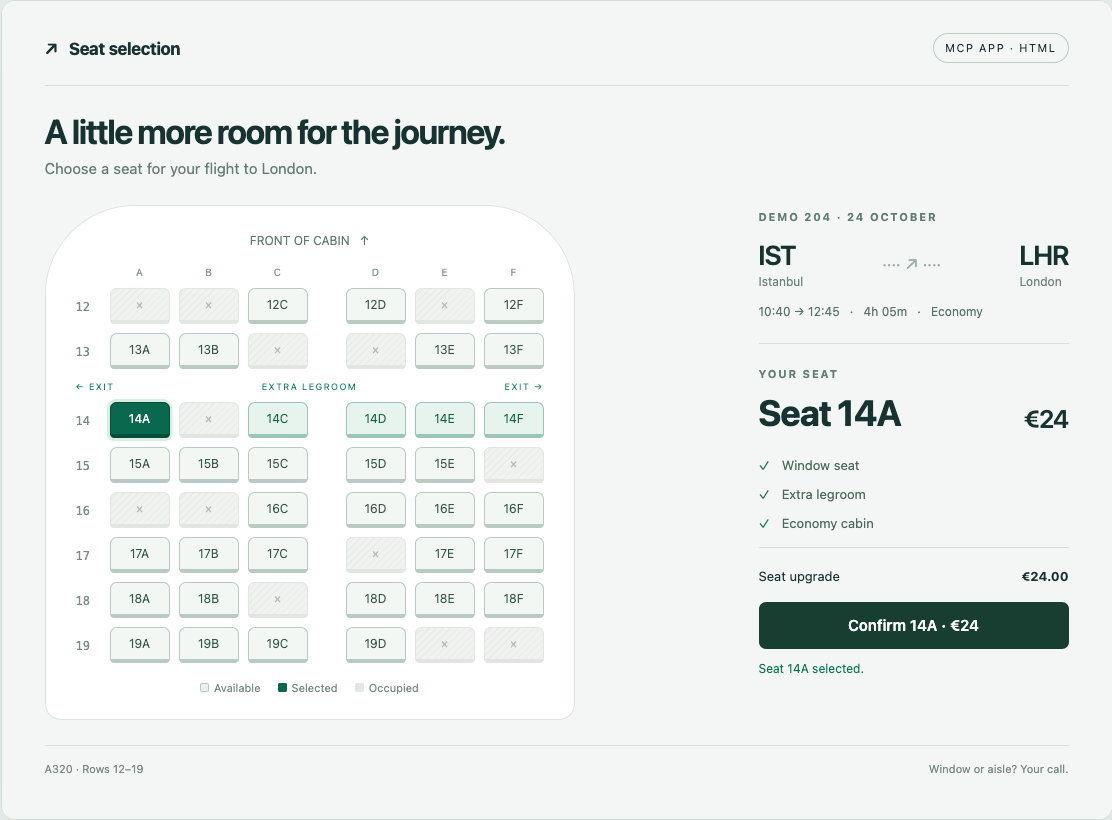
The agent can return a list. It can also recommend 14A. But I might want to see where 14A actually is. Is it near the front? Where is the aisle? What is available around it?
An HTML MCP App is a good fit for this.
[](/assets/images/content/mcp-cli-seats/html-seat-map.png)
*Selecting 14A in the HTML app updates the seat details through MCP.*
The HTML experience has space for a cabin shape, seat buttons, flight details, and a confirmation card. That makes sense in a graphical host.
The current [MCP Apps specification](https://github.com/modelcontextprotocol/ext-apps/blob/main/specification/2026-01-26/apps.mdx) connects tools to UI resources through `_meta.ui.resourceUri`. The resource uses `text/html;profile=mcp-app`, and the app communicates with the host through a bridge. The current specification defines HTML rendering; other content types are left for future extensions.
That is the gap I want to explore.
## Elicitation gets us part of the way
MCP already has a way to ask the user for structured input: [elicitation](https://modelcontextprotocol.io/specification/2025-11-25/client/elicitation).
For this example, the server can send a form request with a seat field. Here is a shortened version with two choices:
```json
{
"jsonrpc": "2.0",
"id": 7,
"method": "elicitation/create",
"params": {
"mode": "form",
"message": "Choose a seat for DEMO 204.",
"requestedSchema": {
"type": "object",
"properties": {
"seatId": {
"type": "string",
"title": "Available seats",
"oneOf": [
{ "const": "14A", "title": "14A · Window · Extra legroom · €24" },
{ "const": "14C", "title": "14C · Aisle · Extra legroom · €24" }
]
}
},
"required": ["seatId"]
}
}
}
```
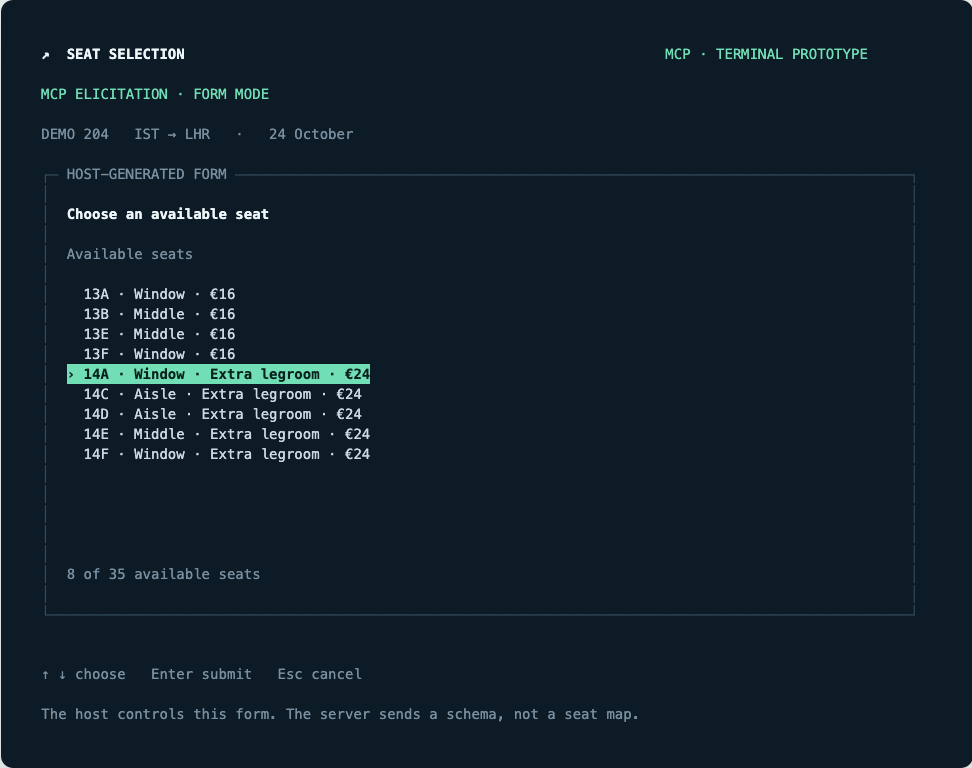
The host decides how to render that input. My demo renders it as a keyboard-controlled list, then asks for confirmation in a second form.
[](/assets/images/content/mcp-cli-seats/elicitation-seat-list.png)
*The same seat selection as an elicitation form.*
Elicitation can produce useful forms through the host. Its schema describes the input you need, but it doesn't define a seat grid, linked panes, or a diff viewer.
For “pick one of these options,” this is useful. I just don't want every app to become a sequence of questions.
## A terminal can show more than a list
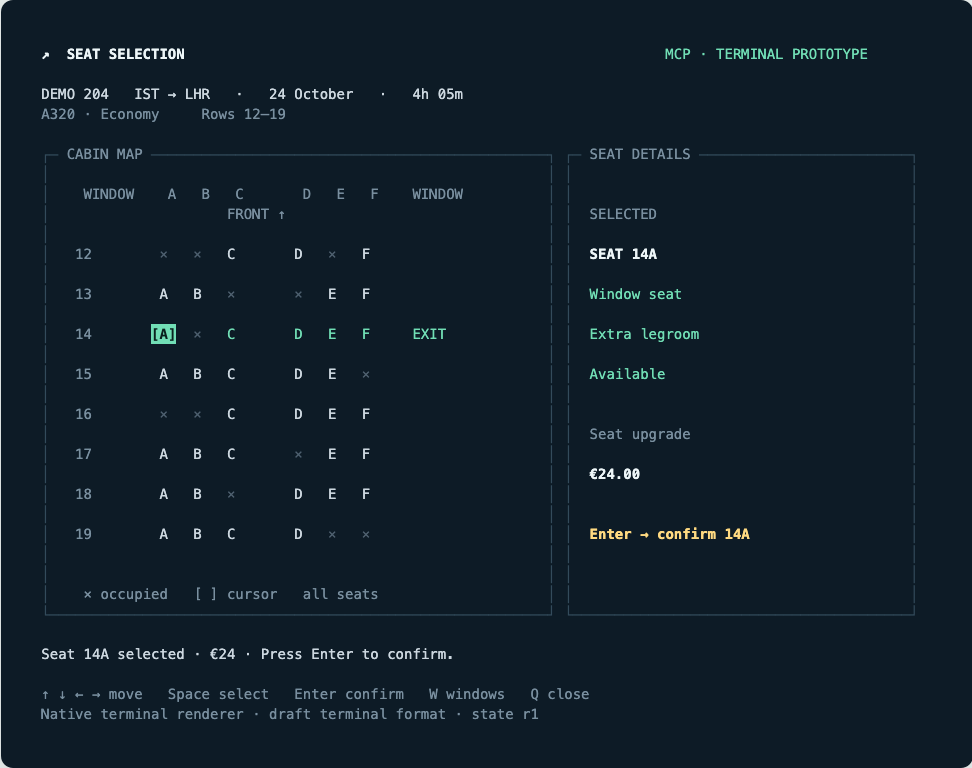
Here is the same example with a terminal-specific view:
[](/assets/images/content/mcp-cli-seats/terminal-seat-map.png)
*The terminal view: a seat grid on the left and details on the right.*
Arrow keys move the cursor. Space selects a seat. Enter confirms the selection. `W` dims non-window seats and limits cursor movement to window seats. Occupied seats stay visible because their position still matters.
The terminal experience can have its own behavior. It doesn't need to reproduce the HTML cabin shape. It needs to preserve the information that helps me choose.
The same idea works for development tools. A deployment app could show versions on the left and changes on the right. A review app could show a file tree and a colorized diff. A log viewer could keep filters visible while the output updates.
## My proposal: one app, separate views
I would keep MCP as the transport and let an app offer more than one representation.
The HTML resource stays as it is. A second resource describes the terminal view as JSON. The host advertises which terminal catalogs it can render, and the server offers a compatible view. A catalog defines the components and properties the host understands.
I'd keep the format small: a view, a set of components, state bindings, and named actions. The host would turn those components into native terminal controls.
For this proposal, the seat picker needs just three components: `SplitPane`, `SeatGrid`, and `SeatDetails`.
A tool could advertise both resources:
```json
{
"name": "show_seats",
"inputSchema": { "type": "object", "properties": {} },
"_meta": {
"ui": {
"resourceUri": "ui://seat-demo/seat-map.html"
},
"dev.fka/terminal-ui": {
"resourceUri": "ui://seat-demo/seat-map.json",
"mimeType": "application/vnd.fka.terminal-ui+json",
"catalogId": "dev.fka:terminal-seat-demo/0.1"
}
}
}
```
A terminal host opts in during MCP initialization:
```json
{
"capabilities": {
"extensions": {
"dev.fka/terminal-ui": {
"catalogs": ["dev.fka:terminal-seat-demo/0.1"]
}
}
}
}
```
The host and server agree on which components can be rendered. A host that doesn't understand this catalog can use another representation.
Here is one possible shape for the terminal resource. The first message creates the view, and the second describes its components:
```json
[
{
"version": "0.1",
"createSurface": {
"surfaceId": "seat-picker",
"catalogId": "dev.fka:terminal-seat-demo/0.1"
}
},
{
"version": "0.1",
"updateComponents": {
"surfaceId": "seat-picker",
"components": [
{
"id": "root",
"component": "SplitPane",
"children": ["cabin", "details"],
"ratio": 0.6
},
{
"id": "cabin",
"component": "SeatGrid",
"seats": { "path": "/seats" },
"selected": { "path": "/selected" },
"onSelect": "select_seat"
},
{
"id": "details",
"component": "SeatDetails",
"selected": { "path": "/selected" },
"onConfirm": "confirm_seat"
}
]
}
}
]
```
The seat inventory comes separately in `updateDataModel` messages, carried by embedded MCP resources with the same `application/vnd.fka.terminal-ui+json` MIME type. Both components read the same selected-seat value. Choosing another seat changes the data; it doesn't need to rebuild the entire interface or lose keyboard focus.
In this example, each action returns a complete data snapshot.
## The actions still go through MCP
When I confirm 14A, the renderer calls the `seat_action` tool with an action payload:
```json
{
"name": "seat_action",
"arguments": {
"name": "confirm_seat",
"surfaceId": "seat-picker",
"sourceComponentId": "details",
"timestamp": "2026-09-09T10:00:00.000Z",
"context": {
"seatId": "14A",
"expectedRevision": 1,
"price": 24
}
}
}
```
This is the `params` object of a `tools/call` request. The action names and `context` fields belong to this app.
The server checks the seat and price against its own state. It rejects occupied seats, old revisions, and confirmation of a different price. Selection doesn't confirm anything. Both renderers use the same checks.
The host handles focus, key bindings, resizing, and tool calls. Each component name maps to a native renderer in the host.
For a shared terminal catalog, I would start with rows, columns, text, lists, tables, inputs, tabs, and split panes. Then add explicit contracts for things like a file tree and a diff viewer. Labels and symbols can distinguish selected, occupied, added, and removed states alongside colors.
Each host would implement the shared components once, so different apps could compose them into their own views.
## What would Codex, Claude Code, and Copilot need?
For this to work inside Codex CLI, Claude Code, or Copilot CLI, the harness needs to support the format.
Each harness would need to negotiate the capability, load the JSON resource, validate its catalog, mount a native view, and route user actions back through MCP. It would also need a clean way to close the view and return a short result to the conversation.
The wire format and behavior tests can be shared. The native rendering code might differ. I don't expect every harness to use the same UI library.
Until a host supports the terminal view, the app can fall back to HTML where supported, then elicitation where appropriate, then a text result.
I want to ask an agent to show me something and then use the right interface for the place I'm already working. Sometimes that is HTML. Sometimes it is a seat map in my terminal. I think MCP Apps should have room for both.